


Cloudflare Web Analytics, Real User Measurements (RUM), or JavaScript Detection are similar services. By enabling these for our hostname(s), we can monitor how real users experience the speed of our website or application, as well as use browser detection for security and analytics.
However, these features can conflict with the Content Security Policy (CSP) header, causing the following error:
Refused to ....... script because it violates the following Content Security Policy directive: "script-src 'self' ..."
This issue occurs when our website uses a strict Content Security Policy (CSP) header, which blocks Cloudflare’s analytics script. We’ve encountered this problem ourselves, and it has also been discussed by others on the Cloudflare Community and Stack Overflow.
At the end of 2025, Cloudflare released a number of major updates, and “Analytics & Logs” is one of them. In this post, I’ll explain why this happens, how to fix it safely, and alternative options if you prefer not to load the script directly from Cloudflare.
What Causes the Cloudflare RUM & CSP Conflict
When RUM or Web Analytics is enabled, Cloudflare automatically injects the required JavaScript snippet into pages. However, if our CSP only allows scripts from 'self' or a whitelist that doesn’t include Cloudflare’s domain, the browser blocks it — resulting in broken analytics and console CSP errors.
Even we allowed the domain but not enabled 'unsafe-eval', the error will still occurs and script will not loaded because its an eval script. Its not recommended to allow eval script following the best practices by HTTP Observatory.
Solution 1 — Allow ‘unsafe-eval’ (Not Recommended)
To allow Cloudflare’s RUM script and ‘unsafe-eval’, we can add the following to our CSP header:
connect-src 'self' https://cloudflareinsights.com . . . . . . . ;
script-src 'self' 'unsafe-eval' https://static.cloudflareinsights.com . . . . . . . ;
Solution 2 — Disable, JS Snippet will not be Injected
Avoiding CSP adjustments, we can disable automatic script injection in Cloudflare’s dashboard:
Steps: (New Dashboard)
- Go to Cloudflare Dashboard → Analytics & logs → Web Analytics → Manage Site
- Under Real User Measurements (RUM), select:
- Disable — to turn it off completely
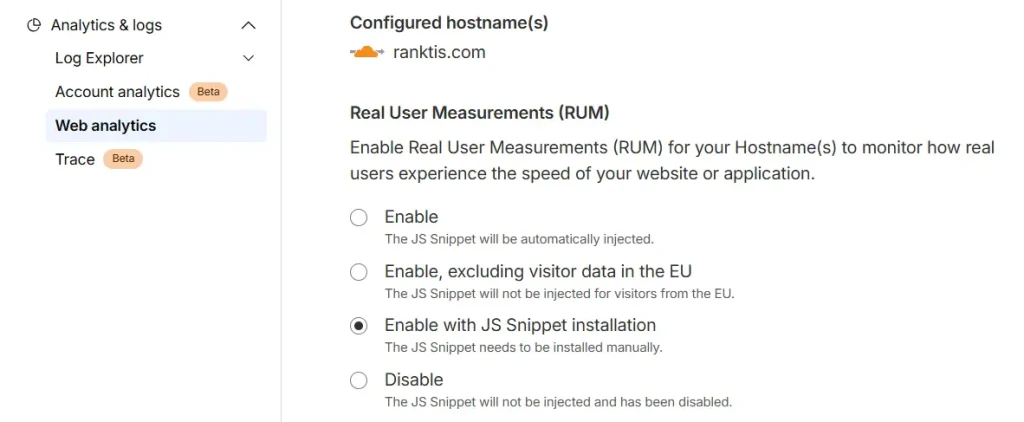
Solution 3 — Host the Script Yourself, Manually
If we select “Enable with JS Snippet installation” in RUM management shows above, Cloudflare will give the snippet:
<script defer src='https://static.cloudflareinsights.com/beacon.min.js' data-cf-beacon='{"token": "your-token"}'></script>This way not required to allow eval script, just allowing cloudflare domain is ok. And If you prefer the script can be hosted localy too.
Load from Child Theme’s function.php for WordPress
function add_cloudflare_web_analytics() {
    echo '<script defer src="https://static.cloudflareinsights.com/beacon.min.js" data-cf-beacon=\'{"token": "your-token"}\'></script>';
}
add_action( 'wp_footer', 'add_cloudflare_web_analytics', 100 );
Cloudflare’s RUM and Web Analytics are useful, but not at the cost of violating a strict CSP. By either allowing Cloudflare’s domains, self-hosting the script, or disabling automatic injection, we can keep both analytics and security working smoothly.